Text
Text
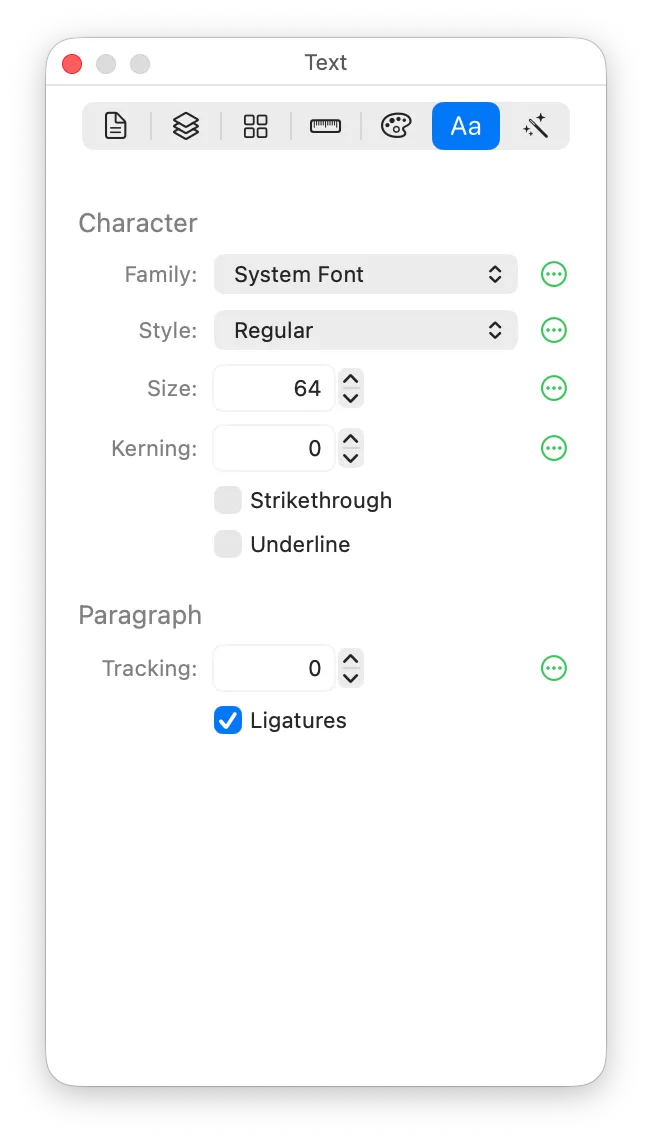
The Character settings apply to the selected characters while you’re editing text, or to the whole text object when it’s merely selected. The Paragraph settings always apply to the whole text object.
Family, Style, Size, Kerning and Tracking can differ per symbol weight. When the Link Geometry control is set to Edit Only This Weight, the pane says which weight you’re editing, and the buttons beside those fields show whether each one varies across weights.
Character
Family
The font family (i.e. the typeface).
You might find it surprising that Family can differ per symbol weight. McKinley makes a best effort attempt to interpolate whatever formatting your text has; if it cannot be interpolated, you’ll get a canvas warning as usual.
Style
The style within the family, such as Regular, Bold or Italic.
Size
The font size, in points.
Kerning
Adjusts the spacing after a character.
Strikethrough
Draws a line through the characters.
Underline
Draws a line under the characters.
Paragraph
Tracking
Adjusts the spacing between all the characters in the text object.
Alignment
Which part of the line sits on the point where you placed the text: its left end, centre or right end. As you type, the text grows away from (or around) that point.
Ligatures
Whether the font’s ligatures are used (for example, joining “fi” into one glyph).